If you are capturing using the Mapillary app and your car, you will want to use a mount which is well set up for Mapillary capture. Here are our recommendations:
Inexpensive Recommendation: “360” mount from AliExpress (~$6 shipped):

The Mapillary app on both Android and iOS supports wide angle modes on modern phones which will capture significantly more of the street than the traditional camera. This is great for street level imagery as you’ll be able to capture more context for both sides of the street.
However, one of the challenges with using wide angle cameras is that if you are mounting your phone inside a car the wide angle will capture a significant amount of the dashboard and hood (and even parts of the phone mount itself) instead of the street. In order to avoid this you want to mount the phone as close as possible to the windshield. Traditional phone mounts include arms which make it difficult to this.
We recommend this inexpensive “360” mount from AliExpress (~$6 shipped) which solves this problem by allowing you to mount the phone very close to the windshield because it doesn’t have a traditional arm. The mount itself is not extremely high quality, but it is “good enough” and most importantly well suited for Mapillary use with wide angle support (it also helps that its inexpensive and globally available).
You can also discuss this mount on the Mapillary forum.
Higher Quality Recommendation: RAM X-Grip with Twist-Lock Suction Cup
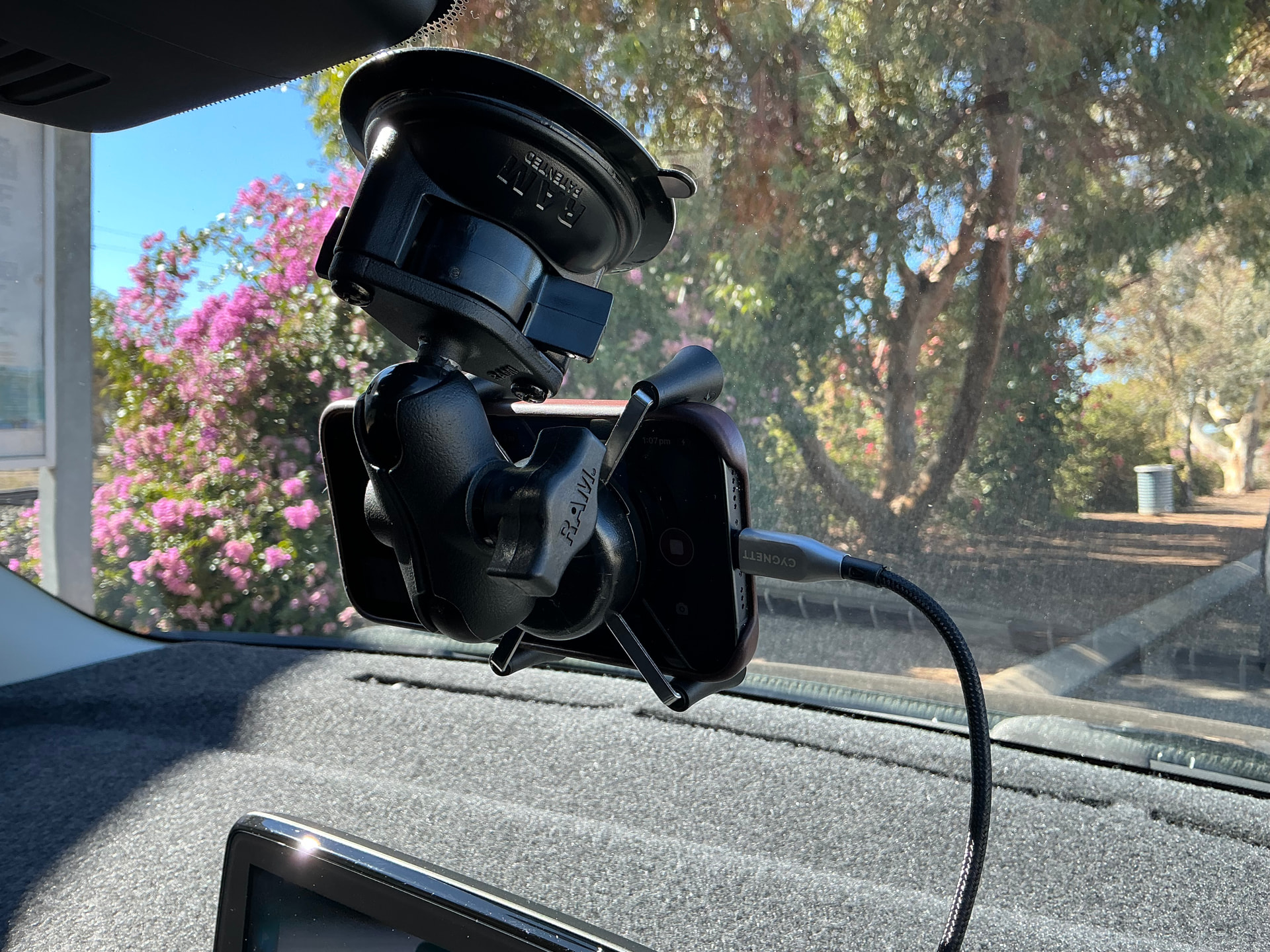
RAM creates very high quality mounts, and Mapillary user wa_wheatbelt writes that the X-Grip with Twist-Lock Suction Cup is a good fit for Mapillary as it:
- Has a short arm to minimize vibrations
- Can be spun around to position the phone closer to the windshield to enable wide-angle capture (as shown above)
However, the RAM line of products is pricy, with this mount coming in at around $75+ USD.
If you aren't able to get either of our 2 picks above, you can also consider these options:
Panvox Magnetic Car Phone Mount:
- Mount comes with simple instructions to assemble
- Magnetic head is used to attach your phone to the mount by sticking a magnet to the back of your smartphone -- the magnets make for a sturdy hold
- Base of the mount is also set up in such a way that it’s very easy to make the necessary adjustments to get a good angle of the road
- Be aware that the adhesives are really strong, so be careful when placing them
- Mount uses a suction cup and magnets to attach to your dashboard/windshield and your phone, respectively
- Mount also comes with a protective film you can stick to your phone to avoid any cosmetic damage when attaching the adhesive magnet
- Extremely simple setup, but it can be difficult to adjust your capture angle once it’s attached to your car, so be careful when doing so
APPS2Car Suction Cup Phone Holder:
- Easy to set up – it’s as simple as connecting one piece (the part that holds the phone) with the base, which has a suction cup on the bottom
- Comes with an optional sticky pad in case you need more grip strength
- Easy to use and reliable
- Ball joint design makes it easy to adjust the mount for an optimal angle of the road while capturing imagery
Be aware that you might have to search a bit to find your perfect mount and setup. What works for one person might not work for another, both due to differences in the capturing environment as well as the build of the vehicle that you’re attaching the mount to.
Note that Mapillary doesn't recommend using your phone when capturing while cycling. Most phones can't handle the motion blur that comes with cycling. We recommend that you use an action camera if cycling instead.